


Power-Saving Silent Luminous Wireless Mouse
Power-Saving Silent Luminous Wireless Mouse - Blue is backordered and will ship as soon as it is back in stock.
Technical Specification
- OEM Part Number:
- Page Yield:
- Color:
- Technology:
- Condition:
- Shelf Life:
- Package Quantity:
- Cartridge Type:
Description
Description
Overview
Quiet Button Design
Left and right buttons produce little noise when you click them. Perfect for public places such as offices, libraries,
dormitories, internet Cafes where you do not want to disturb others or interrupt your concentration.
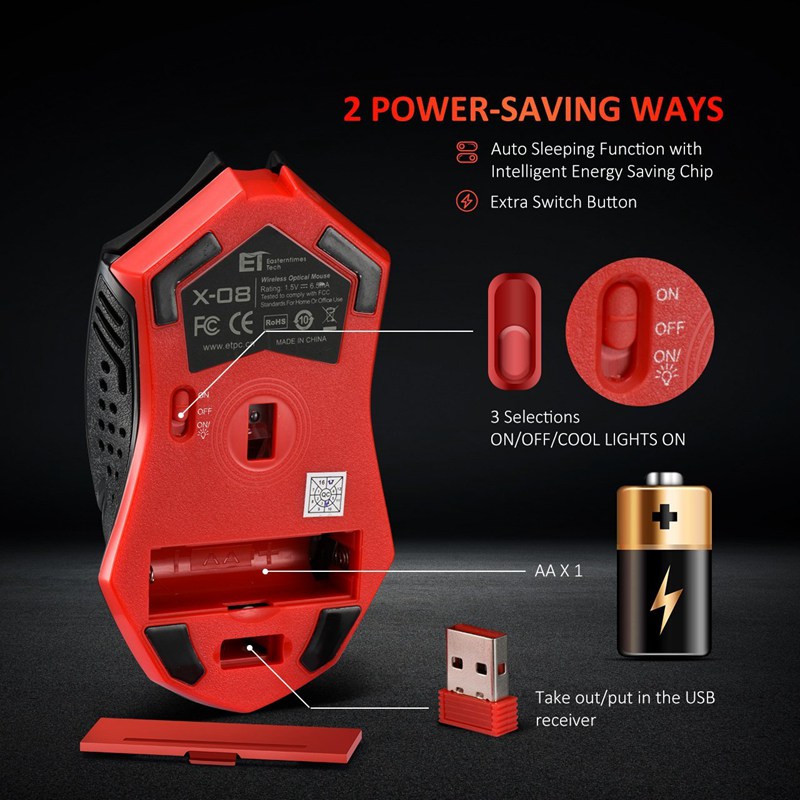
Power Saving Mode and Power Switch off
If the mouse stays out of work for 8 minutes, it will turn to power saving mode, press any button to restart it.
If you turn off the PC or take out the Nano receiver from the USB port, press any button or move the mouse to enter the power saving
mode.
Specification
Press-key Quantity: 7 Buttons(including scroll wheel)
DPI: 800-1200-1600-2000-2400
Power Source: 1*PCS AA Battery(Not included)
Package Content
1* Wireless Mouse
1*USB Receiver
1*User Manual



Advanced Energy-saving Chip
Multi-stage power saving mode, less power consumption. There is a button at the bottom of the mouse,
three options: ON, OFF, ON/light. Put it at ON/light, the LED backlight will light up.
The cursor performs stably. With strong adaptive surface ability, this wireless mouse works fine on many surfaces.


Shipping & Returns
Shipping & Returns
Your order will be shipped from our Toronto Warehouse and delivered to your door within 1-5 days. Once shipped, we will send you a confirmation email with tracking details so you can monitor your package's progress.
30-Day Return Policy
If you’re not satisfied with your purchase, you can return it within 30 days for a full refund, no questions asked. Simply contact our friendly customer service team to arrange an easy return.
2-Year Warranty
Our products are designed to last, and we support this with a 2-year warranty against any manufacturing defects. If you encounter any issues, get in touch with us, and we’ll repair or replace the product at no cost.
For additional information or assistance, please contact our customer support. We’re here to help!